red40_catalyst
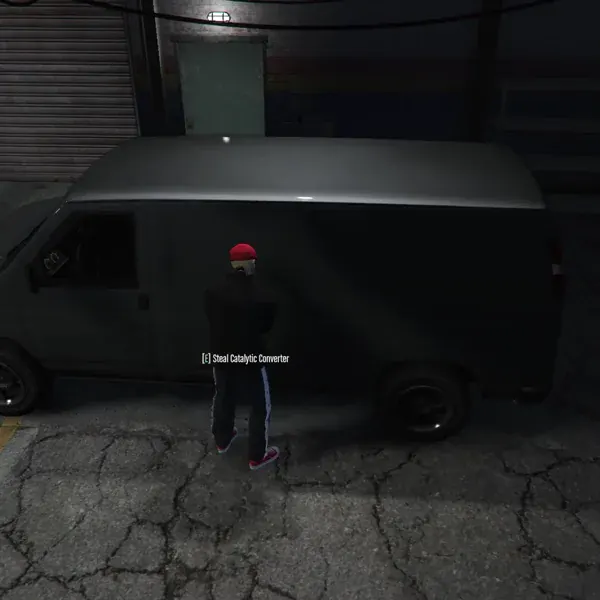
Features
- Synced grinder props, theft animations, and sparks
- Shared vehicle theft status between players
- Configurable converter sizes, theft timing, skill checks, and police alerts
- Reinstall converter items to restore vehicles and their normal engine audio
- Persistent owned-vehicle state across garage storage and resource/server restarts
- Server-side theft validation and timed, distance-checked reinstallation
- Export shops for buying and selling converters (ox_inventory only)
- 3D text or ox_lib TextUI prompts
- Locales for translations
What’s New in v1.1.0
- Owned-vehicle storage for Qbox, QBCore, and ESX, with automatic database migrations
- Usable converter items for reinstallation, with optional original-plate matching
- Server exports for applying, reading, and setting Catalyst state
oxmysqlis now required, even when theft from owned vehicles is disabled
When upgrading, add the red40_catalyst.catalyst server export to all four converter items in ox_inventory, merge the new server settings below, and check your database permissions and resource start order.
Framework Support
- Qbox, QBCore, and ESX
- Qbox uses ox_inventory; QBCore and ESX also have framework-native item handling
- Bridge files are open for custom inventory/framework integrations. Owned-vehicle storage also needs a compatible backend in
server/storage.lua; changing a framework bridge alone does not add storage support.
Requirements
- ox_lib
- oxmysql
- A supported framework with its owned-vehicle table already created
- ox_inventory 2.37.3 or newer for export shops
- ox_target for the default shop targeting, or customize the target functions / set
useTarget = falseinconfig/client.lua ps-dispatchfor the default police alert, or replacedispatchAlertinconfig/client.luawith your dispatch integration
Installation
- Unzip the resource into your server resources, keeping its folder name
red40_catalyst. - Add the grinder and all four converter items to your inventory.
- Copy the files from
images/into your inventory’s image directory. - Configure the resource and owned-vehicle storage as described below.
- Start the dependencies and active framework before
red40_catalyst.
ox_inventory Items
Add these entries to ox_inventory/data/items.lua. When upgrading, update existing entries rather than adding duplicates.
red40_grinder = {
    label = 'Metal Grinder',
    description = 'Used for removing metal or cutting pipes',
    weight = 1000,
    stack = false,
    consume = 0, -- Adjust for durability on use
    server = {
        export = 'red40_catalyst.grinder'
    }
},

small_catalytic_converter = {
    label = 'Small Catalytic Converter',
    description = 'A small catalytic converter, likely stolen',
    weight = 500,
    stack = true,
    server = {
        export = 'red40_catalyst.catalyst'
    }
},

medium_catalytic_converter = {
    label = 'Medium Catalytic Converter',
    description = 'A medium catalytic converter, likely stolen',
    weight = 1000,
    stack = true,
    server = {
        export = 'red40_catalyst.catalyst'
    }
},

large_catalytic_converter = {
    label = 'Large Catalytic Converter',
    description = 'A large catalytic converter, likely stolen',
    weight = 2000,
    stack = true,
    server = {
        export = 'red40_catalyst.catalyst'
    }
},

gigantic_catalytic_converter = {
    label = 'Gigantic Catalytic Converter',
    description = 'A gigantic catalytic converter, likely stolen',
    weight = 5000,
    stack = true,
    server = {
        export = 'red40_catalyst.catalyst'
    }
},
Other Inventories
Add the same five item names in your inventory’s format. The default grinder name is red40_grinder; change item in config/server.lua if you rename it. QBCore converter items must be usable in the inventory (for qb-inventory, set useable = true). The resource registers the grinder and configured converter items as usable through QBCore or ESX when ox_inventory is not present.
Native ESX inventory does not preserve the stolen converter’s metadata, so original-plate matching is only enforced when the item provides plate metadata. Custom inventory bridges must support both adding converters and removing one used converter.
server.cfg
Start ox_lib, oxmysql, your active framework, inventory, and any configured target/dispatch resources before Catalyst. The framework’s vehicle table must already exist. Then add:
ensure red40_catalystUsage
Stealing a Converter
- Use the
red40_grinderitem to equip the grinder. - Approach a non-electric vehicle until the theft prompt appears, then press
E(the defaultpickupKey). - The driver’s seat must be empty and the engine off. Complete the search, progress bar, and configured skill check.
- A successful theft awards a converter based on
catalyst_sizeand changes the vehicle’s engine audio. Owned vehicles are protected by default; enableallowTheftFromOwnedVehiclesto allow theft from them. - Use the grinder again to put it away. With ox_inventory, removing the grinder from your inventory also stops the activity.
Stolen items include red40_catalyst_plate and red40_catalyst_model metadata when supported by the inventory. Converter state is shared, so a vehicle cannot be successfully stripped again until its converter has been reinstalled.
Reinstalling a Converter
- Stand outside of a vehicle whose converter has been stolen. Its driver’s seat must be empty and its engine off.
- Use a converter item matching the missing converter’s type.
- Complete the installation progress bar. The default installation duration is 10 seconds.
Successful installation removes one converter item, clears the stolen state, and restores normal engine audio. For an owned vehicle, the cleared state is also saved to the database. Installation does not require the grinder or vehicle ownership.
With requireOriginalVehicleForInstall = true, an item carrying red40_catalyst_plate metadata must match the target vehicle’s plate. Items without plate metadata can still be installed if their type matches. Set the option to false to allow tagged converters on other vehicles of the matching type.
The server checks elapsed installation time and rechecks distance, plate, and stolen state before removing the item. A vehicle already being stolen from or repaired cannot be used for another operation.
Configuration
Server Settings
The following defaults are in config/server.lua. Merge these fields into the existing configuration; this is not a replacement for the full file.
cooldown = 60, -- Seconds between theft attempts
installDuration = 10, -- Installation time in seconds
requireOriginalVehicleForInstall = true,

storage = {
    autoMigrate = true,
    restoreDelay = 500, -- Milliseconds before reading a newly created vehicle's state
},

allowTheftFromOwnedVehicles = false,catalyst_sizemaps vehicle classes to converter item names. Use'none'for classes without a converter.objectconfigures the grinder model and attachment.catalyst_prices,moneyItem, andexportShopsconfigure the ox_inventory export shops.buyis what the shop pays players;sellis what players pay to buy a converter.
Client Settings
In config/client.lua:
pickupKeyandcancelKeydefault toEandX.findCatalystDelayandstealDurationare in seconds; both default to2.drawText3dcontrols theft prompts.useTargetanduse3DTextcontrol shop interaction.progressBaris shared by theft and installation.skillCheck(vehicle)controls the theft minigame. The shipped function useslib.skillCheck('easy'); it does not useminiGameDifficultyunless you customize it.dispatchAlertandalertDelayMin/alertDelayMaxconfigure theft alerts.vehicleSounddefaults to'TORNADO6'while a converter is missing.
Set shopsEnabled = false in config/shared.lua to disable export shops, including when using an inventory other than ox_inventory.
Translations are provided for ar, de, en, es, fr, id, pl, pt-br, ro, th, and tr.
Owned-Vehicle Persistence
The resource detects the running framework and uses these tables:
| Framework | Owned-vehicle table |
|---|---|
| Qbox | player_vehicles |
| QBCore | player_vehicles |
| ESX | owned_vehicles |
Qbox storage reads the vehicle table directly; it does not call qbx_vehicles exports. Plates are trimmed and uppercased for lookup.
Automatic Migration
With storage.autoMigrate = true, Catalyst adds these columns if they are missing:
| Column | Definition | Purpose |
|---|---|---|
red40_catalyst_stolen | TINYINT(1) NOT NULL DEFAULT 0 | Whether the converter is missing |
red40_catalyst_item | VARCHAR(64) NULL DEFAULT NULL | Which converter item is needed for reinstallation |
The database user needs ALTER permission for automatic migration. The resource does not create the owned-vehicle table itself. Check the server console for Initialized Catalyst vehicle storage using ...; storage initialization failures prevent theft and installation from starting.
Manual Migration
If automatic migration is disabled, add the missing columns before starting Catalyst. Run only the statement for your framework, and omit any ADD COLUMN clause for a column that already exists.
For Qbox / QBCore:
ALTER TABLE `player_vehicles`
    ADD COLUMN `red40_catalyst_stolen` TINYINT(1) NOT NULL DEFAULT 0,
    ADD COLUMN `red40_catalyst_item` VARCHAR(64) NULL DEFAULT NULL;
For ESX:
ALTER TABLE `owned_vehicles`
    ADD COLUMN `red40_catalyst_stolen` TINYINT(1) NOT NULL DEFAULT 0,
    ADD COLUMN `red40_catalyst_item` VARCHAR(64) NULL DEFAULT NULL;
The table names and the plate, red40_catalyst_stolen, and red40_catalyst_item columns are fixed in the query sets at the top of server/storage.lua. Custom schemas require updating those queries.
Restoring Spawned Vehicles
Stolen owned-vehicle state is loaded at startup and applied to existing vehicles. Each newly created vehicle with a valid plate triggers a database lookup after storage.restoreDelay (500 ms by default), including vehicles registered after Catalyst started. Garage respawns and resource/server restarts therefore retain owned vehicles’ missing converters.
If a custom spawner assigns the final plate later than that delay, call ApplyVehicleState after setting the plate. Non-owned vehicles have runtime-only state; the built-in storage does not persist them across restarts.
Server Exports
These exports run server-side. Vehicle arguments are entity handles, not network IDs; convert a network ID with NetworkGetEntityFromNetworkId(netId) first.
ApplyVehicleState
Reload an owned vehicle’s state from the database and apply it to runtime state and the entity state bag. Normal vehicle creation is automatic; use this for custom spawners or after an external database change. Returns true when applied, or false when it cannot apply the state, including non-owned or busy vehicles.
local applied = exports.red40_catalyst:ApplyVehicleState(vehicle)GetCatalystState
Read the current runtime state by plate, including stolen owned vehicles loaded at startup. This does not query the database. The result contains stolen (boolean) and item (the missing converter item, or nil).
local state = exports.red40_catalyst:GetCatalystState(plate)
if state.stolen then
    print(state.item)
end
SetCatalystState
Set or clear a vehicle’s Catalyst state. When setting isStolen = true, supply an item listed in catalyst_size (other than 'none'). This changes vehicle state; it does not award or consume an inventory item.
local success, persisted = exports.red40_catalyst:SetCatalystState(
    vehicle,
    true,
    'medium_catalytic_converter'
)

local cleared, saved = exports.red40_catalyst:SetCatalystState(vehicle, false)
The first return value reports whether runtime state was updated; the second reports whether the requested state was persisted to an owned-vehicle row.
- Owned-vehicle writes must succeed before runtime state changes. A failed write returns
false, falseand leaves runtime state unchanged. - An existing row already containing the requested state counts as persistence success; a missing row does not.
- A successful non-owned vehicle update returns
true, false. - If the vehicle disappears or its plate changes after a successful database write, the result can be
false, true; the runtime update was not applied.
SwapPlates
Move runtime Catalyst state from the old plate to the new plate after another resource successfully updates an owned vehicle’s plate in the database. This export does not change the entity plate or database row.
local moved = exports.red40_catalyst:SwapPlates(oldPlate, newPlate)Returns false for empty plates, identical normalized plates, or unavailable runtime state. Otherwise returns true, including when the old plate has no stolen state to move.