Instant games and set runs
Open /lotto_admin, select Games, and choose New game or the edit icon beside an existing game. The editor separates prize behavior from ticket appearance.
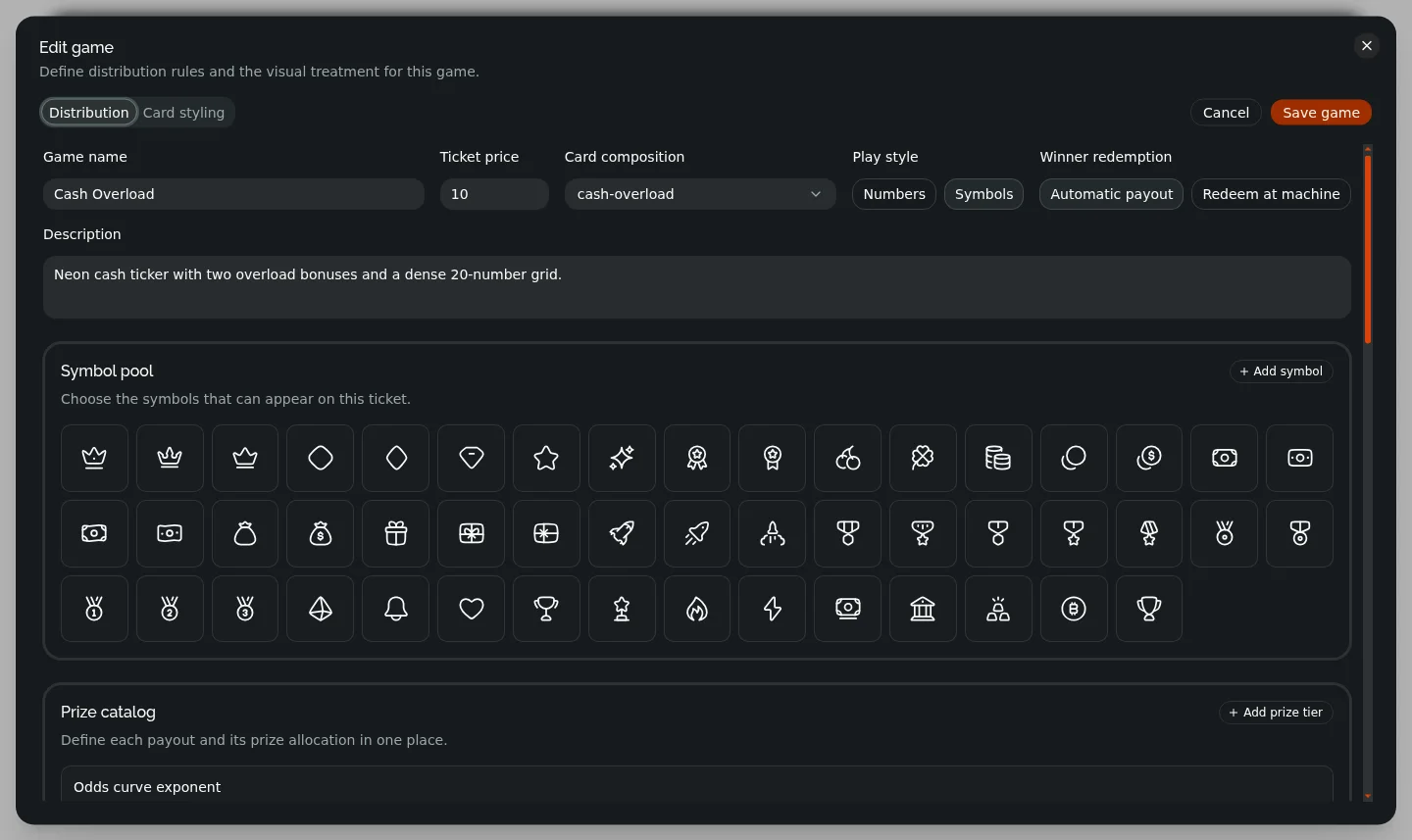
Core game fields
| Field | How it is used |
|---|---|
| Game name | Player-facing name shown in the purchase machine and admin tables. |
| Ticket price | Cash charged for each instant voucher. |
| Card composition | Selects the ticket layout and its available scratch or pull-tab positions. |
| Play style | Number layouts can use numeric matches or a validated pool of HugeIcons symbols. Pull-tab layouts use fixed pull behavior. |
| Description | Player-facing catalog description. |
| Winner redemption | Pays automatically after reveal, or issues a transferable winning ticket that must be redeemed at a machine. |
| Distribution mode | Chooses an exact finite set or probability-based generic generation. |
The Prize catalog defines the label and payout for every possible prize. Pull-tab games also assign a unique three-symbol combination to each tier and support at most seven combinations. Symbol-match games require unique, case-sensitive exports from the free HugeIcons catalog; the editor validates that every icon can load.
Set versus generic distribution
| Mode | Best for | Configuration |
|---|---|---|
| Set of cards | A fixed print run with exact prize inventory. | Run size, exact award quantity per tier, multi-prize toggle, and maximum prizes per card. |
| Generic cards | Continuous sales without a finite inventory. | Overall win rate, prize-tier percentages, preview quantity, multi-win continuation rate, and maximum prizes per card. |
For a set game, awards cannot exceed run size × maximum prizes per card. With multi-prize disabled, each winning card can contain only one award. Cards not assigned an award are losing cards.
For a generic game, tier percentages describe the reward mix among winners and must total 100%. The overall win rate controls whether a generated card wins. If multi-prize is enabled, the continuation rate is tested after each award and stops on the first miss or at the layout’s prize-position limit.
The editor’s financial cards are planning aids. Set summaries are exact for the configured run. Generic summaries are expected values across the selected preview quantity; actual results vary.
Card styling
The Card styling tab provides a live preview and lets you configure:
- A built-in composition and optional tintable surface texture.
- Player-facing headings, instructions, bonus text, rules, and other card copy.
- Card, title, panel, tile, match, prize, footer, and price colors.
- Scratch-foil stripe, border, label, and five-color palette.
- Covered, partially revealed, and revealed preview states.
Copy and colors do not change the win logic. The composition and play style determine the available positions, while the distribution and prize catalog determine outcomes.
Generate a finite set run
A set-based game is not sellable until it has a run:
- Save the game definition.
- From Games, select Create run beside that game.
- Enter the run size and exact award quantities.
- Enable multi-prize cards only if more than one award may be placed on a card.
- Check winning-card count, losing-card count, gross income, payout, and net summary.
- Select Generate run.
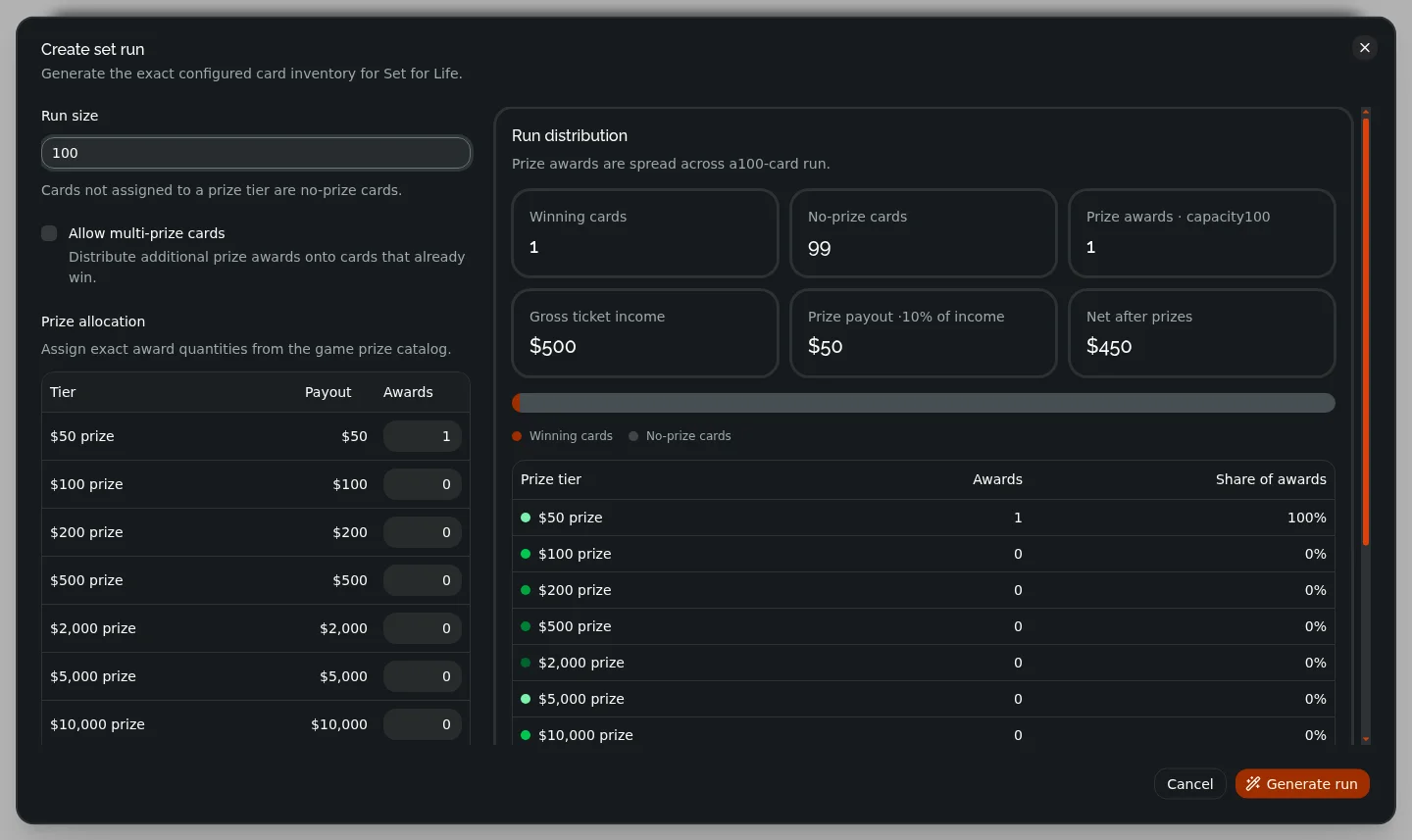
The server generates unique card IDs and stores the run atomically. The Set Runs tab is a read-only record of generated runs and sample IDs; there is no separate run-deletion action. Each run becomes its own machine-catalog entry.
Save, update, and delete behavior
- Every mutation is validated and saved by the server before the panel updates.
- Concurrent edits use
updatedAtconflict checks. Reload the panel if another administrator changed the same game. - Saving a generic game reconciles the machine catalog immediately.
- Generating a run adds that run to the eligible machine catalog and generates its inventory thumbnail.
- Deleting a game is a soft delete: it removes the game and its runs from active administration and sales without erasing historical ticket records.